TEXT dESCRIPTION
1. Decide how many slices of bread you want
2. Take the slices out of bread bag
3. Plug toaster into wall power outlet
4. Turn wall power outlet switch on
5. Insert slice(s) of bread
6. Decide how you want toast done (Light/burned and inbetween)
7. Turn control dial clockwise or anti-clockwise to change setting, settings will vary on different toaster models
8. Make sure settings on toaster are correct and bread is correctly placed in toaster
9. Pull lever thingy down
10. Wait for toast to pop up
11. If you want a toaster to stop early press eject button
12. Take slice(s) of toast out of the toaster and put on plate
Proper List:
1. Place toaster on a stable, hard and flat surface
2. Plug toaster into a wall power outlet
3. Turn power outlet switch on
4. Insert one or two pieces of bread
5. Look at cook setting/light-dark dial
6. Is setting on medium 4-6? Set dial
7. Depress lever and wait for ejection
8. Check darkness of toast. Is it medium to dark brown?
Flow Chart

Mini Site Exercise
Site Map/User Flow


Draft interface/screens

Mini storyboard: Refined Interface screens

Who What Where and why
Chosen issue: Overfishing
Who: Will be using it
What: Your project is
Where: will they be using it
Why: You chose that audience
Who: Primarily geared towards consumers, however other important users such as fishermen or environmentalists related to the issue may also find important information through the concept. It will be targeted towards all ages, but primarily middle-aged adults as they are the biggest bracket of consumers for fish, however it will also be targeted towards children and young adults in school environments to teach them early on the negative impacts and what they can do to help and prevent it.
What: An interactive website that details important information of overfishing, including the endangered species affected by overfishing. It will be displayed through a story type of concept to get audiences more engaged and feel a better connection.
Where: As it is an informative website that will require the use of sound for better immersion it will be designed to be used in the correct place with the correct equipment, most likely, at home, libraries any type of conventions or events relating to overfishing.
Why: I chose middle-aged adults as they are the biggest consumers of fish, as they are either buying their food as they live alone, or for their families and the like. I also chose to include children and young adults in school environments to teach them about the dangers to the world caused by overfishing as it an informative and engaging experience that will appeal to them more.
Illustrator wireframe and interface PNGs for toast
Wireframe

Interface PNGs

https://www.archanaskitchen.com/bread-toast-recipe

Moodboard for Dave Smith

Two User Personas


User Scenario Descriptions
User Scenario 1: This user will be using the website to research information regarding overfishing for an assignment or task, they will be primarily children from primary school to high school and university students as well. These students will be looking for a website that quickly and easily displays information they need in an engaging way, as most other website that display similar information will be bland and boring this website will engage these users in a fun and inviting way. They will be primarily looking at the content of the website and looking for highlighted easy to access information that they can quickly read and learn about.
User Scenario 2: This user will be accessing the website to learn about overfishing from either a personal standpoint or a work standpoint or both. They will be looking for the issues of overfishing from all sides but be specifically looking at the consumer side in more depth as it is the side that affects them the most. These users are individuals that either have a hobby for fishing or may fisherman who sell fish for their income. They will be using the website not only to discover about overfishing and it’s issues but also ways they can contribute to fixing the issue. The story-style driven website will use sound and transitions to force emotions on to this user and as result help them relate to the topic by using similar imagery and noise. This will engage the user to thoroughly review the website with all it has to offer, and look for sections that show what they can do to help.
Moodboard for user personas

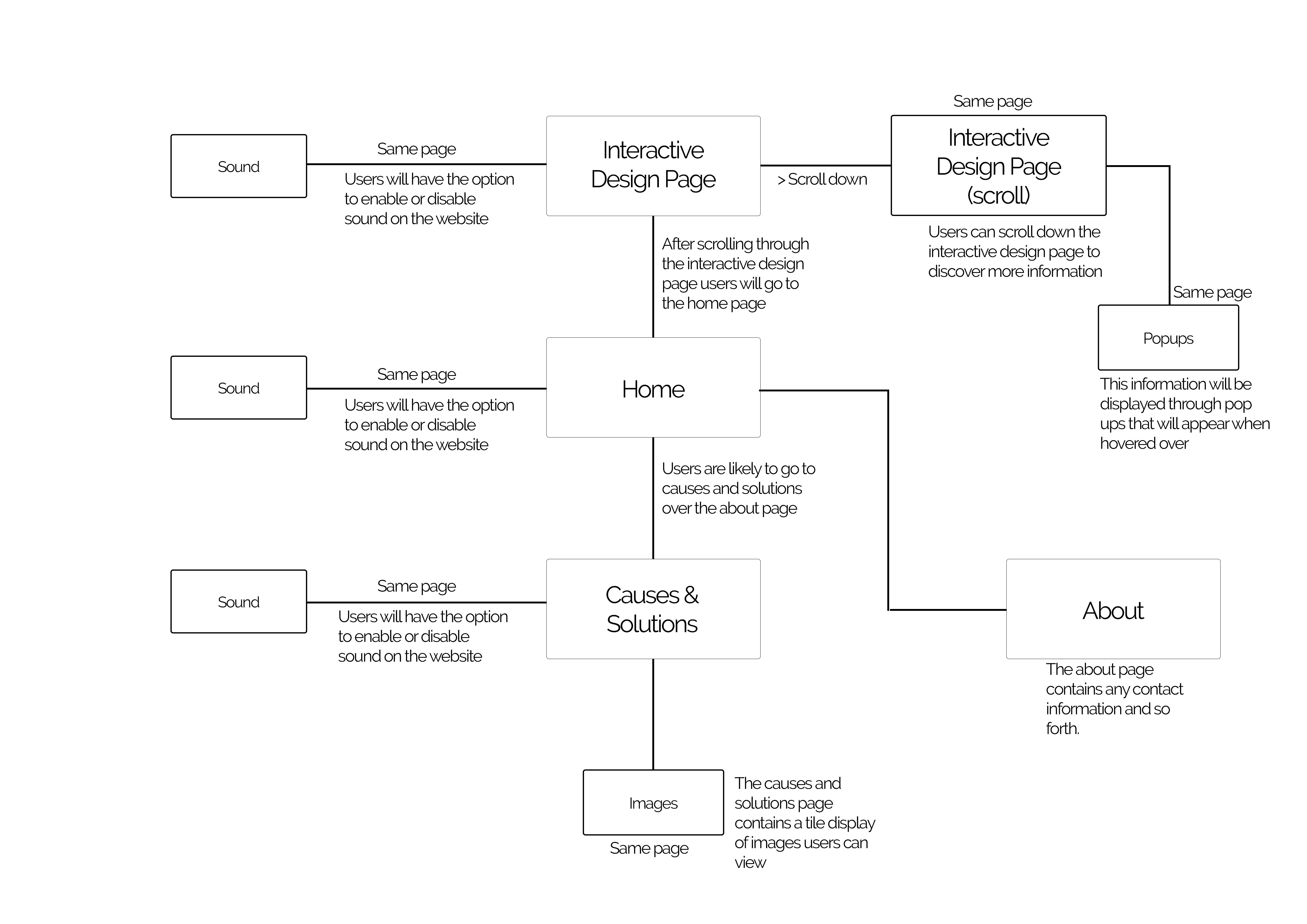
Site Map

Wireframes for key screens

Userflow
Prototype Design Quick Review – phase 1


Logo Review

Prototype Design quick review – phase 2


